
21.53.114341-1.1.2C Edan F300 Fetal Monitor EXT and MARK Interface Board OEM F300 Repair Components
21.53.114341-1.1.2C Edan F300 Fetal Monitor EXT and MARK Interface Board OEM F300 Repair Components
- Product Description
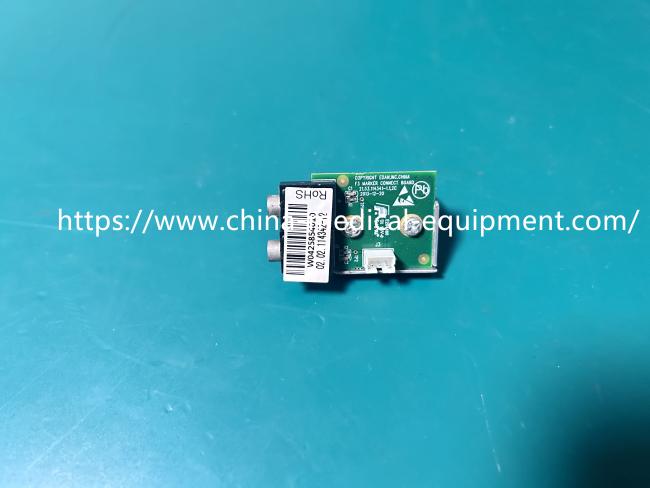
This circuit board is the "External Event/Marker Interface Board" on the Edan F300 series fetal monitor. As seen in the picture, it's a small green PCB with a silver metal shield (for interference prevention), two dedicated metal pins (EXT/MARK), and a set of white ribbon cable sockets.
Its core function is simple: it connects to the "external event button." In the delivery room, when the pregnant woman feels fetal movement or contractions, a nurse or family member presses a button by the bedside. This board then transmits the "marker" signal to the main unit, which simultaneously leaves a mark on the monitor's output, facilitating doctor analysis. If this board malfunctions, it typically manifests as the main unit not receiving the signal from the external button or a poor connection at the interface.
- Product Specifications
| Product Name | EXT and MARK Interface Board |
|---|---|
| Model | 21.53.114341-1.1.2C |
| Material | PCB |
| Function | Event Marking Input |
| Advantages | EMI Protection |
| Color | Green |
- Installation & Tips:
1. Power Off Procedure: Always disconnect the monitor's power supply before replacement to prevent short circuits and damage to the motherboard.
2. Cable Connection: Pay attention to the direction of the white connector. It usually has a foolproof design; insert it gently. Do not force it.
3. Metal Bracket Mounting: Align the metal bracket with the screw holes on the chassis and secure it with the original screws, ensuring proper grounding (this is crucial for interference shielding).
4. Testing: After assembly, power on the monitor and connect the external button for testing. Observe whether a "Mark" mark appears on the screen or recording paper.
Get in Touch
Have questions about our products or want to discuss a custom order? Our team is ready to help you.