
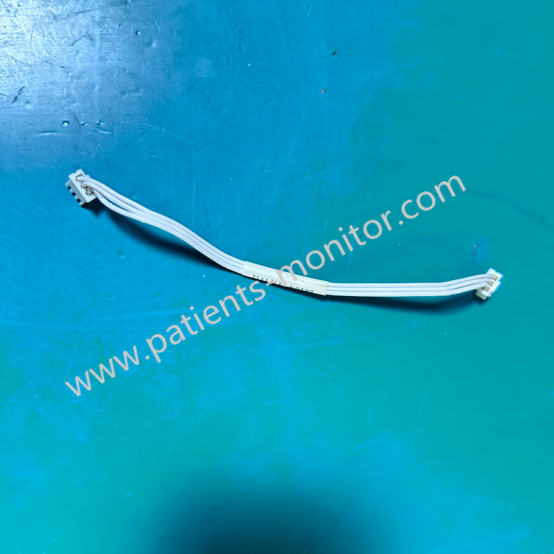
Edan F2 F3 F200 F300 Fetal Monitor Connecting Wire Cable 01.13.114338 for Board Connection
Connection Wiring for Edan Monitor
Edan F2 F3 F200 F300 Fetal Monitor Connecting Wire Cable for Board Connection
► Brief Description
The Edan F2, F3, F200, and F300 series fetal monitors are widely used in various medical environments and hospitals due to their comprehensive functions and high-quality service. They are core devices that ensure the safety of mothers and infants. The internal cable connecting to the motherboard is the "nervous system" that ensures the stable operation of the device. This cable is specifically designed for the Edan F2, F3, F200, and F300 series fetal monitors and is mainly used for signal transmission between the motherboard and other components.
► Detailed Photos
► Feature
The core function of the Edan F2 F3 F200 F300 Fetal Monitor Connecting Wire Cable is to ensure the accurate and real-time transmission of critical physiological data such as fetal heart rate and uterine contraction pressure, avoiding data interruption or distortion due to connection problems.
Here are its main features:
1. Compatible Models: Supports mainstream models such as Edan F2, F3, F200, and F300, ensuring plug-and-play functionality without additional modifications.
2. Signal Type: Supports low-voltage differential signal transmission, possessing high anti-interference capabilities and adapting to the complex electromagnetic environment of hospitals.
3. Physical Characteristics: Employs a flexible flat cable design, possessing excellent flexibility and durability, adapting to the wiring needs of confined spaces within equipment.
4. Interface Type: Standard connectors ensure a secure connection and prevent poor contact due to loosening.
5. Electrical Performance: Stable characteristic impedance and low signal attenuation ensure signal integrity during long-distance transmission.
► Maintenance
● Regularly inspect the cable sheath for damage, dents, or cracks caused by aging.
● When plugging or unplugging, hold the connector body to avoid pulling on the cable and breaking the internal wires.
● Clean the connector with anhydrous ethanol; avoid using corrosive cleaning agents.
► FAQ
Q: How do I determine if the connection cable is faulty?
A: If the device exhibits symptoms such as "no signal," "screen flickering," or "data interruption," first check if the connection cable is loose or damaged. Using a multimeter to test continuity or the replacement method can quickly pinpoint the problem.
Q: Do you support custom lengths?
A: Customization is not supported. The connection cables we provide are original products to ensure signal quality.
Q: What is the minimum order quantity?
A: The MOQ is 1 piece.
Q: Can you use DHL for shipping?
A: Yes, we support shipping from major shipping companies (including FedEx, DHL, UPS, EMS, etc.).
Get in Touch
Have questions about our products or want to discuss a custom order? Our team is ready to help you.