
21.53.451956010.6L EDAN F Series Fetal Monitor Board Main Control PCB for Hospital ICU Clinical Use
21.53.451956010.6L EDAN F Series Fetal Monitor Board Main Control PCB for Hospital ICU Clinical Use
- Product Description
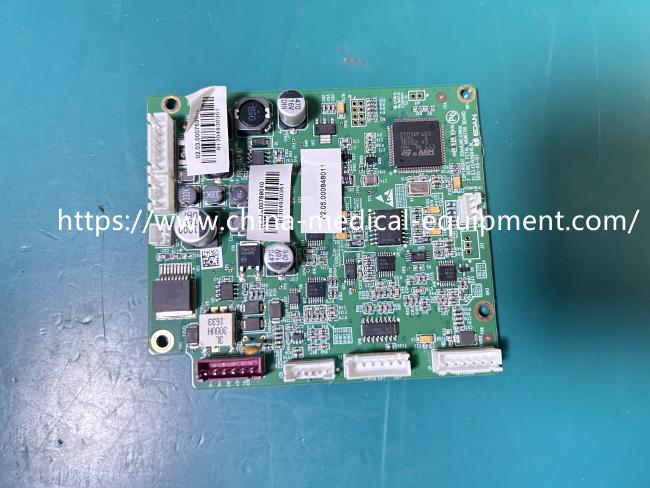
This is a motherboard from an EDAN F-series fetal monitor, model number 21.53.451956010.6L. As seen in the image, this green circuit board is densely packed with various electronic components, including multiple integrated circuit chips, capacitors, resistors, connectors, and barcode labels for factory traceability. It employs a multi-layer PCB design with a compact layout and neat solder joints, meeting the stringent requirements of medical equipment for high reliability, low noise, and interference resistance.
This motherboard is the core control unit of the fetal monitor, primarily responsible for processing key physiological signals such as fetal heart rate (FHR), uterine contractions (TOCO), fetal electrocardiogram (DECG), and intrauterine pressure (IUP). It uses an internal STM32F103 microcontroller for real-time data acquisition and processing, and manages the device's power system, communication interfaces (such as RJ45 and RS232), and data transmission with the central station.
- Product Specifications
| Product Name | EDAN F Series Fetal Monitor Board |
|---|---|
| Model | 21.53.451956010.6L |
| Material | FR4 Multi-layer PCB |
| Function | FHR/TOCO Signal Processing, Data Transmission |
| Interface | RJ45, RS232, FPC Connector |
| Color | Green |
- Usage Guide and Tips
1. Electrostatic Discharge Protection:
When installing this delicate circuit board, always wear an anti-static wrist strap. Medical electronic boards are highly sensitive to static electricity; directly touching the chip pins with your hands may cause irreversible damage.
2. Interface Alignment:
Pay close attention to the interface positions on the board during installation, especially the ribbon cables and power cables. Ensure they are firmly inserted and correctly oriented to avoid short circuits caused by reverse insertion.
3. Software Compatibility:
After replacing the motherboard, it is recommended to check whether the monitor's software version is compatible with the hardware. If the device fails to boot, it is usually due to software incompatibility, requiring re-flashing the corresponding firmware.
4. Professional Operation:
Although motherboard replacement is a common repair procedure, if you are not a professional medical device engineer, it is recommended to perform this procedure under the guidance of a professional to avoid damaging other components due to improper operation.
Get in Touch
Have questions about our products or want to discuss a custom order? Our team is ready to help you.