
Edan F200 fetal monitor back cover gray color plastic material spare part medical
Edan F200 fetal monitor back cover gray color
► Brief Description
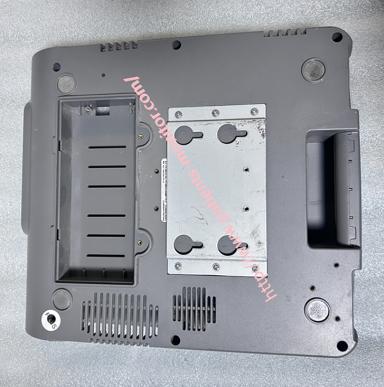
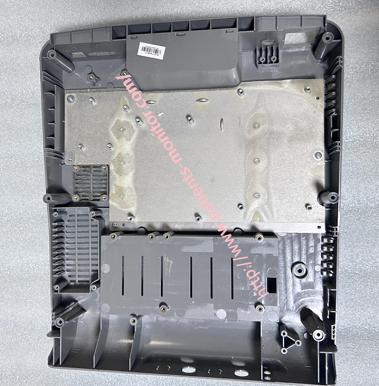
This is the back cover of a fetal monitor, gray in color, made of a special plastic material, compatible with the Edan F200 fetal monitor. This back cover is perfectly compatible with the front cover, together forming the entire outer shell of the fetal monitor. Its main function is to protect and stabilize the monitor. The back cover has many clips and dividers, providing locations for various circuit boards and ribbon cables, facilitating the installation of other accessories and wires. The back cover also has vents to prevent the Edan F200 fetal monitor from overheating during prolonged operation. Screw holes are also present around the perimeter, ensuring the back cover is securely attached to the monitor and preventing it from loosening.
► Specifications
| Brand | Edan |
| Model | F200 |
| Product name | back cover |
| MOQ | 1 piece |
| Warranty | 90 Days |
| Payment Method | T/T ,Paypal ,Western Union |
| Color | Gray |
| Delivery | 3-5 Working Days |
| Condition | Original |
| Payment Terms | Full Before Shippment |
| Delivery Method | DHL ,Fedex ,UPS |
| Stock Situation | Stock available |
| Packing | Carton |
| Use for | Edan F200 fetal monitor |
| Material | Plastic |
►Detailed Photos
►Rear Cover Installation Steps
1. Ensure the device is powered off and the power cord is unplugged. It is recommended to wear an anti-static wrist strap or operate in a static-free environment.
2. Place the monitor face down on a soft work surface.
Slightly snap the top edge of the rear cover into the main body, checking that the clips around the edges are aligned and ensuring no cables are trapped. Starting from the top, press the rear cover evenly and gently along the edges until you hear a "click" sound from the plastic clips around the edges, ensuring it is fully engaged.Tighten all parts of the rear cover.
3.After installation, check that the openings on the rear cover, such as the printer compartment door, network interface, and probe interface, are completely aligned.
►Attentions
1.Unless you are a biomedical engineer from the hospital or an authorized technician from the manufacturer, it is strongly recommended that you do not disassemble the device yourself, as this may affect the accuracy of the equipment or cause safety issues.
2.If you disconnected the internal battery cable or probe interface board connection during disassembly, ensure that these cables are reconnected and secured before closing the back cover.
3.After installation, it is recommended that you do not install any printing paper and test the function of all buttons and interfaces to ensure they are working properly.
If you are interested in Edan F200 fetal monitor back cover gray color, please feel free to contact me, Wish you have a happy life.
Get in Touch
Have questions about our products or want to discuss a custom order? Our team is ready to help you.