
Edan F200 fetal monitor complete casing excluding display screen spare part used
Edan F200 fetal monitor complete casing excluding display screen spare part
► Brief Description
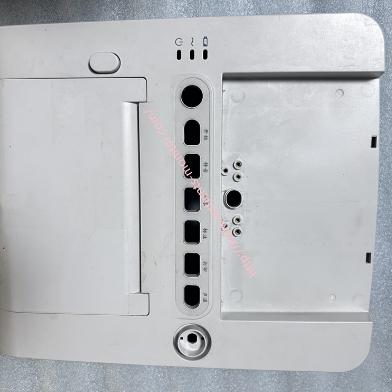
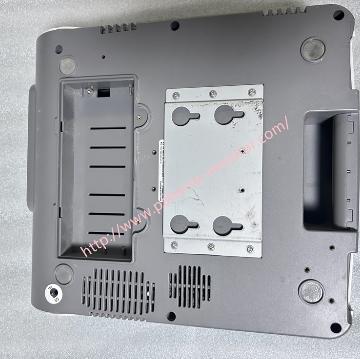
This complete housing does not include the display screen. It is made of a sturdy and durable special plastic material with a smooth, flat surface that is easy to wipe and clean. It also has a certain degree of corrosion resistance, able to withstand daily disinfection and chemical exposure. It features appropriately sized button holes for easy installation. The interior of the housing has various clips and screw holes for added security, preventing loosening even during transport and impacts. The side of the housing has a row of probes and cable interfaces; users can directly connect the interfaces as needed using the indicated connections.
► Specifications
| Model | F200 |
| Brand | Edan |
| Product name | complete casing including display casing |
| MOQ | 1 set |
| Warranty | 90 Days |
| Payment Method | T/T ,Paypal ,Western Union |
| Use for | Edan F200 fetal monitor |
| Product Edge | Original,Advanced equipment |
| Delivery | 3-5 Working Days |
| Color | White |
| Payment Terms | Full Before Shippment |
| Delivery Method | DHL ,Fedex ,UPS |
| Stock Situation | Stock available |
| Material | Plastic |
| Type | spare part |
►Detailed Photos
►Casing Installation Steps
1.Disconnect All Power
Before closing the housing, ensure the motherboard, speakers, battery connection cable, and probe interface board are correctly secured in their corresponding positions on the bottom or front cover.
2.Align the Housing
Align the front and back covers. Usually, align the top or bottom of the device first, then gently press around the perimeter to fully engage the clips. A "click" sound usually indicates the clips are locked.
Note: Do not use excessive force. If one side cannot be closed, check if any cables are caught.
3.Tighten the Screws
Flip the device over and check the screw holes.
Usually, tighten the screws on the display side first, then tighten the screws on the back. Do not tighten all screws at once; pre-tighten them all, then tighten them one by one at the end to prevent uneven stress on the housing.
4.Inspection
Gap Check: Check that the gaps around the housing are even and tight, and that there is no warping.
5.Functional Test:
Power on the device and check if the screen display is normal.
Test the button responsiveness.
►Special Precautions
1.The screen and button cables of the F200 are relatively fragile. When closing the cover, ensure the cables are fully embedded in the slots and have sufficient length to avoid breakage.
2.This device typically has some liquid splash resistance. Before installation, please check that the sealing strip is in its original position and not twisted.
3.Screw Length Difference: Screws in different locations may have different lengths. If a long screw is accidentally screwed into a short hole, it may puncture the casing or damage the internal circuit board. It is recommended to manually screw the screw in two turns before installation to feel the resistance. If it cannot be screwed in, stop immediately and check if it is in the wrong hole.
Thank you for your time, if you are interested in our Edan F200 fetal monitor complete casing excluding display screen product, please let me know.
Get in Touch
Have questions about our products or want to discuss a custom order? Our team is ready to help you.