
Rear Case Assembly Kit with Power Cable Buckle For GE B450 Patient Monitor REF DLG-001-02
Rear Case Assembly Kit with Power Cable Buckle For GE B450 Patient Monitor REF DLG-001-02
► Brief Description
The Rear Case Assembly Kit, part number DLG-001-02, with Power Cable Buckle, is for the GE B450 Patient Monitor. This rear case is made of robust plastic, resistant to impacts, and features internal clips for secure attachment to the device. Ventilation holes prevent overheating due to prolonged operation. The power cable buckle effectively locks the power plug in place, preventing power loss due to accidental pulling and thus avoiding the risk of data loss or monitoring interruption in critical situations.
► Specifications
| Part number | DLG-001-02 |
| Product Name | Rear Case Assembly Kit |
| Condition | Original new |
| MOQ | 1 set |
| Payment Method | Paypal,T/T,Western Union |
| Warranty | 90 Days |
| Delivery Method | DHL ,Fedex ,UPS |
| Stock Situation | Stock available |
| Delivery | 3-5 Working Days |
| Payment Terms | Full Before Shipment |
| Packing | Carton |
| Use for | B450 Patient Monitor |
| Color | White |
| Material | Plastic |
►Detailed Photos
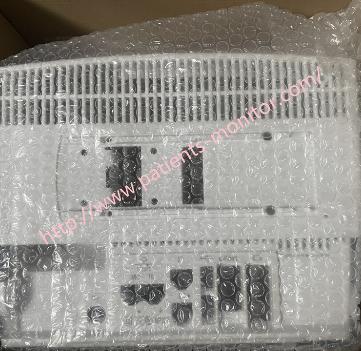
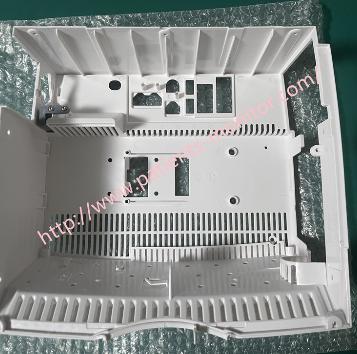
►Pre-installation Preparation
1. Check Internal Connections: Ensure all ribbon cables and power cables between the motherboard, power board, and parameter module interface board are securely inserted into their corresponding sockets and that the latches are locked.
2. Organize Cables: Straighten the internal cables and secure them with cable clips, ensuring that the cables do not protrude beyond the latch positions on the edge of the casing.
3. Clean Contact Surfaces: Clean dust or foreign objects from the joint between the rear cover and the front panel, ensuring the sealing ring is correctly positioned and intact.
►Rear Cover Assembly Installation Steps
1. Align the Rear Cover: Align the top of the rear cover assembly with the top of the front panel of the host, and carefully snap the rear cover together from top to bottom.
2. Press to Lock: Press evenly along the edge of the casing until you hear a "click," indicating that the internal latches are locked. Do not forcefully tap if the alignment is incorrect, as this may damage the latches.
3.Initial Fixation: Do not tighten all screws yet. Install 2-4 diagonally positioned screws first, such as the top two, and gently screw them in, ensuring the front and rear cover seams are evenly aligned.
►FAQ:
Q: How can I pay for it ?
A: Western union, Paypal, T/T are available
Q: How long will it take for me to receive the package?
A: About 3-8 days depends on your order quantity.
Q: What is your terms of delivery?
A: International Express : DHL,UPS,FedEx, also can use customer's freight forwarder.
Thank you for your attention, if you are interested in Rear Case Assembly Kit with Power Cable Buckle For GE B450 Patient Monitor REF DLG-001-02, please contact our sale team .
Get in Touch
Have questions about our products or want to discuss a custom order? Our team is ready to help you.