
AD0412MX-G70 DC 12V 4010 Mini Square Cooling Fan 40x40x10mm 2-Wire 12 Volt Replacement for BLT M66
AD0412MX-G70 DC 12V 4010 Mini Square Cooling Fan 40x40x10mm 2-Wire 12 Volt Replacement for BLT M66
- Product Description
This ADDA AD0412MX-G70 is a high-quality mini cooling fan specifically designed for precision electronic equipment. As seen in the picture, it features a compact square black plastic frame with dimensions of only 40x40x10mm, making it ideal for installation inside space-constrained medical and industrial devices. The fan is equipped with red-black twisted wires and a white 2-pin connector, supporting DC 12V power supply for stable and ultra-quiet operation. As an OEM or compatible replacement for medical devices like the BLT M66 Patient Monitor, it effectively dissipates accumulated heat, preventing system failures caused by overheating and ensuring long-term stability. It is a critical component for maintaining the accuracy of medical monitoring data.
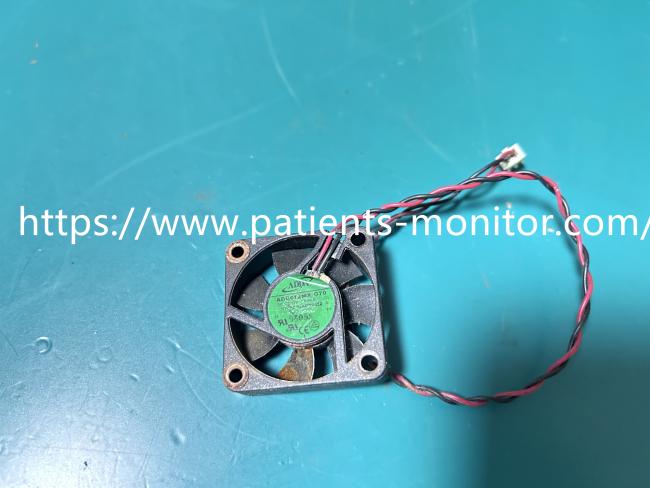
- Product Specifications
| Product Name | Mini Square Cooling Fan |
|---|---|
| Model | AD0412MX-G70 |
| Material | Plastic Frame, Sleeve Bearing |
| Function | Internal Electronic Cooling |
| Product Type | DC Axial Fan |
| Warranty | 90 days |
- Use Tips
Installation Steps:
1. Locate the mounting holes:
The fan has standard 4mm mounting holes at its four corners. Align these holes with the screw holes inside the device and gently tighten the M3 screws (6-8mm length recommended). Do not overtighten, as this may crack the plastic frame.
2. Connect the power cord:
Align the white 2-pin connector with the "FAN" or "12V" connector on the motherboard and gently push it in until it locks in place. If inserted incorrectly, the fan will not rotate. In this case, unplug the connector and reverse the direction to try again.
3. Test operation:
Power on the device and observe whether the fan rotates smoothly clockwise (viewed from the fan blades), without any abnormal noise or vibration. If a "humming" sound or uneven speed occurs, it may be due to tangled cables or uneven installation. Please readjust the fan.
4. Clean the airflow:
After installation, check that there are no obstructions between the fan intake and internal heat-generating components (such as motherboard chips and power modules) to ensure unobstructed airflow.
Routine Maintenance:
1. Regular Dust Removal:
It is recommended to clean the dust on the fan blades and frame every 3-6 months using a soft brush or compressed air to prevent dust accumulation from causing a decrease in fan speed or an increase in noise.
2. Observe for Abnormalities:
If the fan speed slows down, the noise suddenly increases, or it stops working, please stop using it immediately and replace it to prevent overheating or damage to components due to poor heat dissipation.
Get in Touch
Have questions about our products or want to discuss a custom order? Our team is ready to help you.