
GE PRO1000 Patient Monitor Front Cover 705111 Blue Color Spare Part for Hospital ICU
GE PRO1000 Patient Monitor Front Cover 705111 Blue Color Spare Part for Hospital ICU
► Brief Description
The 705111 front cover is blue and made of a special plastic material that is very sturdy and durable, able to withstand the impacts of daily work without cracking. The surface features clearly marked function buttons in different colors for easy identification. The inside also has clips and cable management channels for convenient installation and space-saving design. The front cover is also waterproof and dustproof, protecting internal components from moisture, and is perfectly compatible with the GE PRO1000 Patient Monitor.
► Specifications
| Model | 705111 |
| Brand | GE |
| Product Name | Front Cover |
| Condition | Original |
| MOQ | 1 piece |
| Delivery Method | DHL ,Fedex ,UPS |
| Payment Method | Paypal,T/T,Western Union |
| Warranty | 90 Days |
| Delivery time | 3-5 Working Days |
| Type | spare part |
| Material | Plastic |
| Inventory | In stock |
| Use for | GE PRO1000 Patient Monitor |
| Color | Blue |
►Detailed Photos
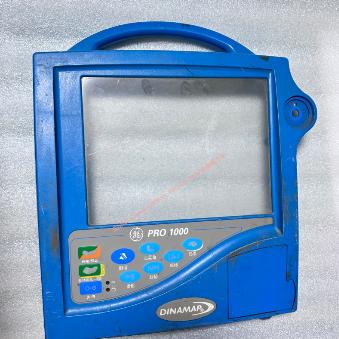
►Features:
Structural Strength: The casing can withstand accidental drops or impacts, protecting the internal display and motherboard.
Chemical Corrosion Resistance: The surface undergoes a special treatment process to resist corrosion from commonly used hospital disinfectants (such as alcohol and chlorine-based disinfectants), preventing cracking or discoloration.
Electromagnetic Compatibility: As part of the overall casing, the front cover is electromagnetically shielded, ensuring the monitor is not interfered with by external factors when acquiring weak signals such as ECG and blood oxygen saturation.
►Installation Steps:
1. Removing the Back Cover and Disconnecting Connections
First, remove the screws securing the back cover and open the device. Before replacing the front cover, be sure to disconnect the ribbon cable connecting the front cover and the motherboard to avoid damage from pulling.
2. Transferring Internal Components
If the new cover does not include a button film or screen, remove the button circuit board, display screen, rotary encoder, and other components from the old cover, clean them, and transfer them to the new cover. Carefully check that the conductive adhesive strips and connectors are correctly aligned.
3. Installation and Reassembly
After securing the internal components to the new cover, connect the ribbon cable. Fasten the front cover to the back cover, being careful not to press on the internal cables. Tighten the screws diagonally, using moderate force to prevent stripping of the plastic posts.
If you want to explore more details about the GE PRO1000 Patient Monitor Front Cover 705111 , please contact our sale teams, looking forward to hearing from you.
Get in Touch
Have questions about our products or want to discuss a custom order? Our team is ready to help you.