
GE PRO1000 Patient Monitor mainboard with network card interface and SPO2 interface 2010339-001
GE PRO1000 Patient Monitor mainboard with network card interface and SPO2 interface 2010339-001
► Brief Description
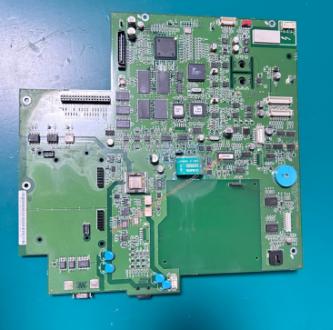
This is a motherboard for a GE PRO1000 Patient Monitor, featuring a network card interface and a SP02 interface, part number 2010339-001. This green, metal board is the core component of the monitor, analogous to the brain of the human body. It primarily coordinates various parameter modules, processes data, drives the display, and enables external communication. The network card interface expands the monitor's capabilities and facilitates the export of patient data for archiving. The SP02 interface enables real-time monitoring of patient SP02 data for medical staff to use in diagnosis.
► Specifications
| Model | 2010339-001 |
| Product name | mainboard |
| MOQ | 1 piece |
| Warranty | 90 Days |
| Payment Method | T/T ,Paypal ,Western Union |
| Use for | GE PRO1000 Patient Monitor |
| Product Edge | Original,Advanced equipment |
| Delivery | 3-5 Working Days |
| Color | Green |
| Payment Terms | Full Before Shipment |
| Delivery Method | DHL ,Fedex ,UPS |
| Stock Situation | Stock available |
| Material | Metal |
| Type | spare part |
►Detailed Photos
►Functions of Motherboard 2010339-001
1.The 2010339-001 motherboard undertakes the critical tasks of core system control and data processing. Data from all modules on the monitor is ultimately transmitted to the motherboard for processing and integration.
2.The motherboard is responsible for power control, battery charging management, and main interface processing, serving as the control center of the entire device.
3.The motherboard also contains multiple fuses as circuit protection measures to ensure the safe operation of the device in complex electrical environments.
►Installation Procedure
1. Remove the back cover: Using a suitable screwdriver, unscrew the screws securing the monitor's back cover, remove the cover, and expose the internal motherboard.Disconnect all connecting cables from the old motherboard and note their locations. Unscrew the screws securing the motherboard and carefully remove it.
2. Install the new motherboard: Insert the new motherboard, align it with the screw holes, and secure it with screws. Do not overtighten. Reconnect all previously disconnected cables to the new motherboard in their original positions.Network Interface: Used for wired network connection; simply plug in the network cable.
Pulse Oxygen Interface: Typically used to connect the pulse oxygen probe. The interface will be clearly labeled; simply plug in the pulse oxygen probe cable.
3. Post-Installation Testing
Confirm that the motherboard is securely installed, all cables are connected correctly, and there are no foreign metal objects remaining.Connect the power supply and check if the device starts normally.After entering the main interface, test the screen touch, buttons, pulse oxygen, ECG, and other functions one by one to ensure they are working properly.
If you have any questions regarding the GE PRO1000 Patient Monitor mainboard 2010339-001 or need assistance with installation, please do not hesitate to contact our technical sales team.
Get in Touch
Have questions about our products or want to discuss a custom order? Our team is ready to help you.