
GE PRO1000 Patient Monitor Parameter Panel Component 2012709-001 for Hospital ICU
GE PRO1000 Patient Monitor Parameter Panel Component 2012709-001
► Brief Description
This is the Parameter Panel Component for the GE PRO1000 Patient Monitor (Part Number: 2012709-001). Constructed from gray plastic, the panel is exceptionally sturdy and durable; it serves to protect internal cables and circuit boards while offering resistance against dust and water ingress. The surface is smooth and flat, featuring a prominent parameter interface and two attached red cables that connect directly to the monitor's internal circuitry. This panel is responsible for real-time monitoring of patient data and transmitting that information to the main board of the PRO1000 monitor.
► Specifications
| Brand | GE |
| Product Name | Parameter Panel Component |
| Warranty | 90 Days |
| Part number | 2012709-001 |
| Payment term | Full before shipment |
| Delivery Method | DHL ,Fedex ,UPS |
| Delivery | 3-5 Working days |
| MOQ | 1 Piece |
| Type | Spare part |
| Material | Plastic |
| Packing | Carton |
| Inventory | In stock |
| Condition | Original |
| Color | Grey |
►Detailed Photos
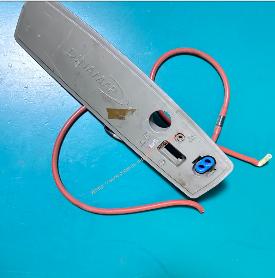
►Parameter Panel Component Functions
1.ECG: Monitors heart rate and rhythm, and detects arrhythmias.
2.NIBP: Measures systolic pressure, diastolic pressure, and mean arterial pressure in adults, children, and neonates.
3.SpO2: Provides continuous monitoring via non-invasive pulse oximetry technology.
4.RESP: Monitors the patient's respiratory rate.
5.Alarm Management: The component integrates an alarm management system that triggers audible and visual alarms when monitored parameters exceed preset limits. A remote alarm function enables the transmission of alarm information to a central monitoring station.
►Installation Steps
1. Power Off and Disconnect All Connections
Turn off the monitor's power supply, unplug the power cord connected to the main unit, and remove the battery to ensure the device is completely de-energized.
2. Disassemble the Monitor Casing
Using a suitable screwdriver, remove the screws securing the monitor's rear cover or bottom panel.
Carefully open the casing. Due to the intricate internal design of the monitor, it is recommended to handle the components gently to avoid straining or pulling on internal connecting cables.
3. Replace the Parameter Board
Locate the parameter board requiring replacement inside the monitor.
Carefully disconnect all ribbon cables or connectors attached to that parameter board. Note: Before disconnecting, it is advisable to take photos or make markings indicating the connection position and orientation of each cable to ensure correct re-installation later. Unscrew the fasteners securing the board and remove the old parameter board.
Align the new parameter board with the interface ports and mounting holes, then tighten the screws. Next, referring to the markings made earlier, reconnect all cables and connectors to their original positions, ensuring that all connections are secure.
4. Reassembly and Testing
Reattach the main unit's casing, tighten the screws, reinstall the battery, reconnect the power cord, and power on the device for testing.
After powering on, access the monitor's maintenance or service mode to perform functional tests on the newly installed parameter board, ensuring that it operates correctly and generates no alarm messages.
If you have any questions about the GE PRO1000 Patient Monitor Parameter Panel Component 2012709-001, please contact us at any time, looking forward to hearing from you.
Get in Touch
Have questions about our products or want to discuss a custom order? Our team is ready to help you.