
Comen STAR 8000C Patient Monitor Network Card Interface Board 8000C USB 1.1 Used
Comen STAR 8000C Patient Monitor Network Card Interface Board 8000C USB 1.1
► Brief Description
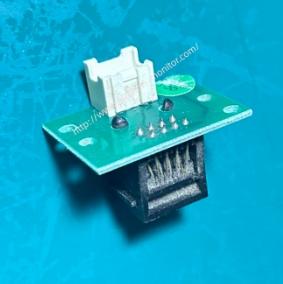
The Network Card Interface Board, part number 8000C USB 1.1, is green and made of durable metal. It features two interfaces on each side: one for connecting to the monitor and the other for connecting other devices. This network card interface board is a core functional module of the Comen STAR 8000C monitor, playing a crucial role in data exchange between the device and the external environment. Its precise size fits the pre-installed mounting slots inside the STAR 8000C unit, and it seamlessly connects to the motherboard via a dedicated high-speed cable, ensuring a stable connection and lossless signal transmission. This modular design also supports plug-and-play maintenance, effectively reducing equipment repair complexity and downtime.
► Specifications
| Brand | Comen |
| Part number | 8000C USB 1.1 |
| Use for | STAR 8000C Patient Monitor |
| Product Name | Network Card Interface Board |
| Condition | In good working |
| MOQ | 1 Piece |
| Delivery Method | DHL ,Fedex ,UPS |
| Payment Method | Paypal,T/T,Western Union |
| Warranty | 90 Days |
| Color | Green |
| Material | Metal |
| Stock Situation | Stock available |
| Payment Terms | Full Before Shipment |
| Weight | 0.2KG |
►Detailed Photos
►Core Functions
In addition to basic data communication functions, the 8000C USB 1.1 network interface board also performs the following key functions:
1.Central Monitoring Network: Connects to the hospital's local area network via the RJ45 port. A single central monitoring system can connect to up to 128 bedside monitors, enabling centralized monitoring of multiple beds, remote waveform observation, and alarm event linkage.
2.Data Export and Traceability: The USB interface supports the export of over 72 hours of full-parameter monitoring data, including trend charts, abnormal waveforms, and alarm event records, facilitating clinical summarization and quality control.
3.Firmware Online Upgrade: The interface board supports online upgrades of the device's system software via USB storage devices or network connections. This optimizes system performance, fixes vulnerabilities, and expands monitoring functions without disassembling the device, effectively extending its lifespan.
►Installation Steps
1.Remove the monitor's back cover: Use a screwdriver to unscrew the screws securing the monitor's back cover and carefully remove it to expose the internal motherboard area.
2.Locate and open the slot: Locate an unused slot on the motherboard that matches the gold fingers of the interface board. Use a screwdriver to unscrew and remove the metal retainer corresponding to the slot, and keep this retainer safe.
3.Insert the network interface board: Align the gold fingers of the interface board vertically with the slot on the motherboard. After ensuring alignment, use both thumbs to apply even pressure and smoothly and slowly push the board in until it is fully in place. The retaining clip at the bottom of the interface board will be fully flush against the chassis.
4.Secure and check: Secure the interface board to the chassis with screws. Then visually inspect to ensure the interface board is installed correctly, the gold fingers are fully inserted, and there is no misalignment.
5.Reassemble and power on: After confirming that the installation is correct, reinstall the monitor's back cover and tighten the screws. Connect the power cord and power on the monitor.
Thank you for your attention, if you want to explore more details about the Comen STAR 8000C Patient Monitor Network Card Interface Board 8000C USB 1.1 , feel free to send an inquiry.
Get in Touch
Have questions about our products or want to discuss a custom order? Our team is ready to help you.