
Sunray SRF618B Fetal Monitor Printer Board G2E8AFC 22108.0.06.9 replacement part
Sunray SRF618B Fetal Monitor Printer Board G2E8AFC 22108.0.06.9 replacement part
► Brief Description
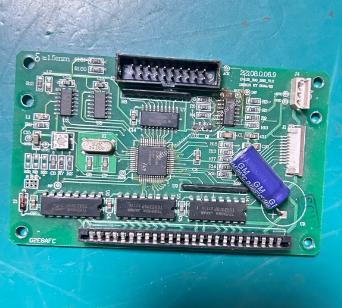
The Sunray SRF618B Fetal Monitor Printer Board, part number G2E8AFC 22108.0.06.9, is a replacement part. It is green, weighs approximately 0.15 kg, and features numerous ports to precisely match the hardware parameters and interface specifications of the host device. It can be used directly without modification.The board is marked with the original part number, indicating a perfect match with the SRF618B Fetal Monitor. Screw holes are provided around the board for easy and secure mounting on the device, preventing it from easily loosening.
► Specifications
| Brand | Sunray |
| Model | G2E8AFC 22108.0.06.9 |
| Product Name | Printer Board |
| Condition | Original |
| MOQ | 1 piece |
| Payment Method | Paypal,T/T,Western Union |
| Warranty | 90 Days |
| Delivery Method | DHL ,Fedex ,UPS |
| Stock Situation | Stock available |
| Material | Metal |
| Payment Terms | Full Before Shipment |
| Packing | Carton |
| Use for | Sunray SRF618B Fetal Monitor |
| Color | Green |
►Detailed Photos
►Features
1.High processing speed: Accurately receives real-time data from the motherboard, achieving synchronous printing without delay or misalignment, and accurately reproducing even subtle fluctuations in fetal heart rate.
2.Utilizes medical-grade high Tg FR-4 substrate, which possesses excellent high-temperature resistance and corrosion resistance, enabling long-term continuous operation in the complex environment of hospitals.
3.Integrated circuitry for comprehensive overvoltage, overcurrent, and overheat protection: Automatically cuts off or limits output in abnormal operating conditions, protecting the entire machine and ensuring the safety of medical personnel.
4.All external interfaces undergo special anti-oxidation treatment, ensuring reliable contact even with frequent plugging and unplugging and in different environments.
►Installation Steps
1. Open the right side panel of the machine to expose the internal structure. Remove all screws used to secure the printer board and note their location and number. If the old board has a ribbon cable connected to the motherboard, carefully disconnect it. Remove the old board.
2. Align the new board with the guide rails and mounting holes, and smoothly push it into place, ensuring the interface aligns with the chassis cover. Then secure it with screws.
3. Locate the power connector on the board and connect the corresponding power cable. Note the difference between the 5V main control power supply and the 24V printhead high-voltage power supply; do not reverse or mix them up. Carefully check the wire sequence (positive and negative).
Insert the data ribbon cable connecting to the motherboard into the "Host Communication Interface" on the board to ensure accurate signal transmission. Connect the ribbon cable controlling the printhead, ensuring good contact for precise printing control.
4. Carefully check that all cables, connectors, and screws are securely fastened.
After confirming everything is correct, close the machine panel and tighten the screws.
Power on the machine and enter the printing function menu to test printing.
Thank you for your attention, If you are interested in Sunray SRF618B Fetal Monitor Printer Board G2E8AFC 22108.0.06.9, please feel free to send inquiry to me. Looking forward to hearing from you.
Get in Touch
Have questions about our products or want to discuss a custom order? Our team is ready to help you.