
Carewell ECG-1112 ECG machine display screen 320240ALA.VER1 Spare Part
Carewell ECG-1112 ECG machine display screen 320240ALA.VER1 Spare Part
► Brief Description
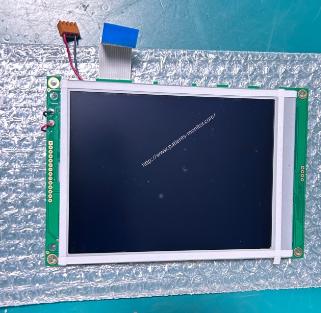
The Carewell ECG-1112 ECG machine display screen, part number 320240ALA.VER1, is a 5.6-inch monochrome STN screen with a resolution of 320×240 pixels, a dot pitch of 0.36mm, and an effective display area of approximately 115mm×86mm. The display features a blue background with white text, offering high contrast and uniform viewing angles. Even in bright office lighting or low-light conditions at night, waveforms and text remain clearly legible. Long-term use shows no ghosting or burn-in.
The display driver utilizes COB packaging technology and integrates a dedicated control IC. Device connection is achieved via an 8-bit parallel port, RGB, or SPI interface, ensuring smooth and stutter-free ECG waveform refresh and keeping baseline drift and waveform distortion within clinically acceptable ranges. The backlight system uses side-lit LEDs, providing uniform brightness, stable color temperature, low power consumption, and a long lifespan, effectively reducing overall energy consumption and extending device battery life.
► Specifications
| Model | 320240ALA.VER1 |
| Product name | Display |
| MOQ | 1 piece |
| Warranty | 90 Days |
| Payment Method | T/T ,Paypal ,Western Union |
| Use for | Carewell ECG-1112 ECG machine |
| Product Edge | Original,Advanced equipment |
| Delivery | 3-5 Working Days |
| Material | Metal |
| Payment Terms | Full Before Shippment |
| Delivery Method | DHL ,Fedex ,UPS |
| Stock Situation | Stock available |
| Type | spare part |
►Detailed Photos
►Features
1.A high information density of 320×240 pixels allows for the complete display of 12-lead synchronized ECG waveforms, heart rate values, filter status, and paper speed/sensitivity settings, meeting the needs of simultaneous multi-information display in clinical settings.
2.The device's "freeze" function can freeze the waveform across the entire LCD screen, facilitating careful observation of abnormal ECG waveforms by doctors.
3.The display screen is covered with anti-glare tempered glass, which is scratch-resistant, easy to clean, and can withstand repeated wiping with disinfectants such as alcohol and iodine, fully complying with hospital infection control requirements.
4.Certified by the ISO13485 medical device quality system, each screen undergoes rigorous aging tests and display calibration before leaving the factory to ensure consistent display and stable performance.
►Replacing the Display Screen:
1. Turn off the device and disconnect the power cord and all connecting cables, especially the ECG leads.
2. Place the device on a clean, flat surface. Using a screwdriver, carefully remove all screws securing the back cover or front shell of the device. After removing the screws, gently open the casing. Be gentle to avoid pulling on the internal connecting cables. You will now see the motherboard and display assembly.
3. Locate the ribbon cable connecting the display screen to the motherboard. Inspect the ribbon cable connector; it is usually a flip-up clip or has push-button clips on both sides. Take a picture with your phone to record the exact location and orientation of the ribbon cable. Carefully unlock the connector and then smoothly pull out the ribbon cable. Also, remove any additional screws or clips securing the display screen. Remove the retaining clips or screws holding the old screen in place and gently remove the old screen from its position.
4. Place the new display screen into the compartment in the correct orientation and position, and secure it with the retaining clips or screws. 5. Take out the prepared ribbon cable and smoothly and fully insert it into the motherboard connector. Ensure the cable is not bent, then tighten the connector clips until you hear a "click".
6. Before completely reinstalling the casing, perform a power-on test.
Connect the power supply and power on the device to observe if the new screen lights up normally. Check for any abnormalities in the display, such as lines, flickering, or uneven colors. If everything is normal, power off the device and reinstall the casing.
7. Final Testing and Calibration
Reconnect all external devices, power on the device, and allow it to run its self-test program to confirm that all functions are normal.
Thank you for your time, if you want to more details for Carewell ECG-1112 ECG machine display screen 320240ALA.VER1 , please contact us. Looking forward to hearing from you
Get in Touch
Have questions about our products or want to discuss a custom order? Our team is ready to help you.