
PHiliph IntelliVue MX40 Patient Monitor Display Top Frame With Touch Screen
PHiliphh IntelliVue MX40 Patient Monitor Display Top Frame With Touch Screen
Features
It can be used to move freely.
Patients can use the IntelliVue MX40 to comfortably move around the care unit or hospital while being wirelessly monitored in the IntelliVue iX information center.
Durable, easy to clean and disinfect
The IntelliVue MX40 has a unique cable connector designed to reduce dirt and liquid buildup, and the housing is designed to withstand high-level disinfectants, including regular disinfection.
Manage alerts based on your clinical protocol
IntelliVue MX40 displays alerts in the message center only when the patient is near or moving, and can be configured to display alerts and beeps to meet her clinical needs.
Choose the battery according to your preferences
Power your IntelliVue MX40 with disposable AA batteries or a single PHiliphh rechargeable battery, the choice is yours
Specification
| Type | 2.8" QVGA Color LCD |
| View Area | 43.2mm x 57.6 mm (1.70" x 2.26") |
| Resolution | 240 x 320 |
| Backlight | White LED |
| ECG Display Sector Size (height) | 13.5mm (portrait), 9.9mm (landscape) |
| ECG Display Sweep Speed | 10mm/s with 4.32 sec of viewable ecg data (portrait), 10mm/s with 5.76 sec of viewable ecg data (landscape) |
| Resp Display Sweep Speed | 2.5mm/s with 17.28 sec of viewable resp data (portrait) 2.5mm/s with 23.04 sec of viewable resp data (landscape). |
"Sleep" color touch screen to save battery power and protect patient privacy. Local displays and alarms can be activated at the touch of a button. The screen can be locked to prevent accidental changes by providing a measurement view and authorized access (via PIN code).
Select display items
Tap on a specific item to access actions associated with that item. For example, press Patient Information to display the Patient Information window, or press HF Numbers to display the ECG Settings menu. Touch the ECG waveform to display the waveform selection menu.
screen lock
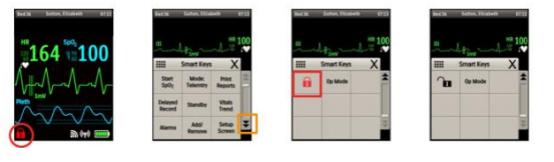
To prevent accidental patient access to the MX40, the monitor can be locked using SmartKey Lock. When Lock is selected, the SmartKey menu automatically switches to the home screen.
After selecting Unlock, the SmartKey menu must be closed to return to the home screen.
The screen will automatically lock if there is no interaction for the configured time (1-30 minutes, default is 5 minutes).
Possible User Interface Issues
1.The MX40 screen does not turn on.
- The AA battery compartment can be inserted upside down.
- Users may not understand that they have to press the blue start button for two seconds.
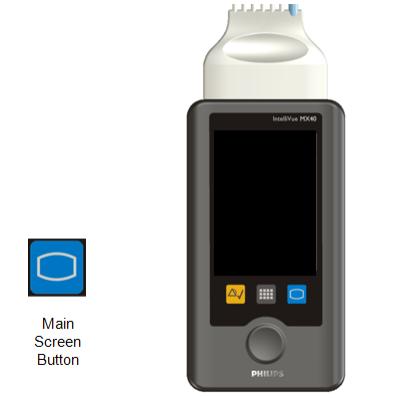
2.MX40 screen does not respond to touch.
- The screen is locked and must be unlocked with the unlock SmartKey.
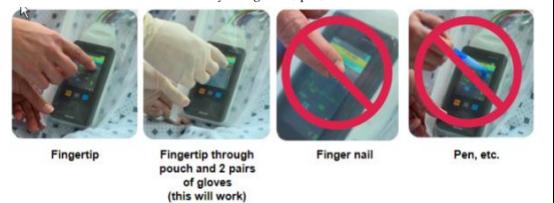
- The user does not touch the screen with a finger. The MX40 does not respond to contact with fingernails, pens, etc.
If you're intersted in PHiliphh IntelliVue MX40 Patient Monitor Display Top Frame With Touch Screen,feel free to contact us .Thank you .
Get in Touch
Have questions about our products or want to discuss a custom order? Our team is ready to help you.