
2600 Lumens High Brightness Smart Projector With 65W Studio Audio AI Telescopic Rod
2600 Lumens High Brightness 65W Studio Audio AI Telescopic Rod Smart Projector
Description:
- 2600 lumens brightness keeps the image clear in daylight conditions; no need for a darkened room.
- Built-in 65W speaker system provides sufficient volume for most meeting or classroom settings, making external speakers optional rather than necessary.
- The patented AI automatic electric lift bracket detects surface tilt and adjusts projection height within seconds, achieving leveling without manual shims.
- Google TV 14.0 is preinstalled, with wireless screen mirroring support for iOS, Android, and Windows devices.
- A custom triple cooling system prevents overheating-related lag and image quality degradation.
- Dual-band WiFi 6 and Bluetooth 5.0 are included for wireless connectivity.
- Operating noise is below 30dB. A 1-year official warranty is provided.
Quick informations:
| Name | C5 Enterprise-GTV |
| Brightness | 2600 Lumens |
| Speaker | 65W (20W*2+5W*1) |
| Power | 200W |
| AC-IN | AC 100V-240V |
| Color | Black |
| Operate Methods | Button/Remote Control |
| Weight | 4.23kg |
| Size | 455*295*110mm |
Features:
- Intelligent Auto Focus System (auto focus, auto keystone, four-point keystone, auto obstacle avoidance, auto rotation correction, auto screen alignment, electric stand, auto position, full frame digital zooming)
- 2600 lumens brightness – clear even with ambient light
- 65W high-fidelity stereo sound – no external speakers needed for most venues
- AI automatic electric lift bracket – auto leveling, eliminates keystone distortion
- Supports 300-inch screen & 4K Ultra HD decoding
- Google TV 14.0 with wireless screen mirroring (iOS/Android/Windows)
- Dual-band WiFi 6 & Bluetooth 5.0
- Interfaces: DC power, audio jack, USB, charging port, HDMI
- <30dB quiet operation & 1-year warranty
Parameter Table
| Intelligent Auto Focus System | Eletric Focus Adjust, Auto Focus, Auto Keystone, Four-point Keystone, Auto Obstacle Avoidance, Auto Rotation Correction, Auto Screen Alignment, Eletric Stand, Auto Position, Full Frame Digital Zooming | |
| Memory | RAM | 2GB |
| ROM | 8GB | |
| Light Source | LED | |
| Display Technology | LCD | |
| Throw Ratio | 1.28:1 | |
| Contrast Ratio | 1500:1 | |
| Light Source Life | 30000H+ | |
| Screen Scale | 16:9 | |
| Noise Level | <30db | |
| WIFI | 2.4G+5G Dual bands WiFi 6 | |
| Bluetooth | BT 5.0 | |
| Input/Output | DC Power*1,Jack*1,USB*1,Charging Port*1,HDMI*1 | |
| OS | Google TV 14.0 | |
| Wireless Screen Mirroring | Yes(IOS/Android/Win) | |
| Native Resolution | 1920*1080P | |
| Certification | CE,RoHS,KC,FCC,WEEE | |
| Projector Size | 455*295*110mm | |
| Weight | 4.23kg | |
Projection Distance
| Screen Size (inch) | Screen Area W*H (m) | Distance (m) |
| 42 | 0.93*0.53 | 1.19 |
| 56 | 1.33*0.75 | 1.70 |
| 66 | 1.55*0.87 | 1.98 |
| 86 | 1.86*1.05 | 2.38 |
| 100 | 2.21*1.35 | 2.83 |
| 120 | 2.66*1.49 | 3.40 |
| 150 | 3.32*1.87 | 4.25 |
* The projection size and distance data in the table above is based on the throw ratio. Actual results may vary, so please use this only as a reference.
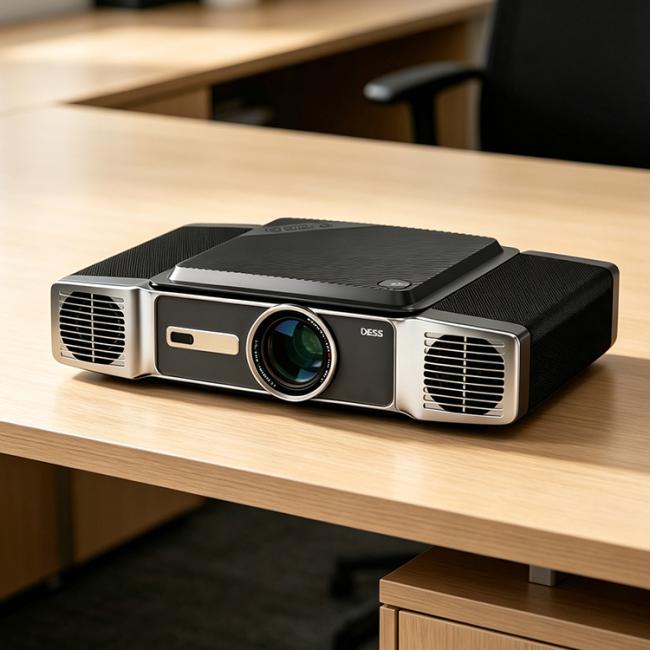
Product Photo:
Product Interface:

Remote Operation:

Notices:
- Do not put the projector in the place where the warm air flows from the air conditionsdirectly. Condensation of water or high temperature may lead to product damage.
- Please ensure no gather things around the projector and the vent is not blocked to avoidoverheating.
- Please prevent foreign objects such as nails or paper scraps from falling into theprojector. Don't insert any metal objects such as iron wires or screwdrivers into theprojector. If any foreign object falls into, please turn off the power immediately and askprofessional technician to take it out.
- Put the projector far away from the liquid to avoid damage by liquid leakage.
- Please use soft packing material to protect the projector if any long-distance transportneeded. In the meanwhile, prevent from violent crashes and shaking. Use cotton sheetwith 75% medical alcohol to wipe the lens if any stains or finger prints on it.
- Do not look into the lens directly after the projector is turned on, the strong lights mighthurt your eyes.
- Do not touch the front vent after a long time running, the vent may be heated and mightburn your skin.
- Please do not open the projector and conduct repair by yourself. If there is anything wrong,please contact with authorized customer service center for help.
- Please do not locate the projector into the rain or heavy moist to avoid fire or electricleakage.
OEM/ODM Service:
If you wish to display your own brand logo on the projector, remote control, packaging box, user manual, or other accessories, our OEM and ODM services are available to meet your requirements. Customization options include logo printing on the projector housing, silk-screen branding on the remote control, custom packaging and labels, boot-up logo or animation, and pre-installed software or launcher configuration. Our engineering team can work with your design files and provide samples for approval before mass production. For volume orders, we offer turnkey solutions from artwork confirmation to final assembly. Please contact our sales team with your specific needs for a tailored proposal and quotation.
Get in Touch
Have questions about our products or want to discuss a custom order? Our team is ready to help you.