
Mindray BeneVew T1 Patient Monitor parts Rechargeable Li-Ion Battery LI12I002A 7.4V 2500mAh 18.5Wh
Mindray BeneVew T1 Patient Monitor Rechargeable Li-ion Battery LI12I002A 7.4V 2500mAh 18.5Wh
► Brief Introduction
The equipment is designed to operate from battery power when external power supply is not available. The monitor uses external power supply as primary power source. In case of power failure, the equipment will automatically run power from battery. So we recommend you always install a fully charged battery in the equipment.
You can also check the battery’s charge status by pressing the battery gauge button at the top of the battery to illuminate the charge indicators. The charge indicators consist of 5 LEDs, each representing 20% of the total power.
► Overview
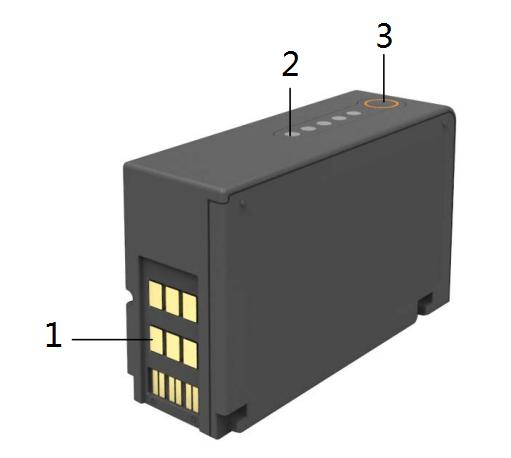
| 1 | Battery connector |
| 2 | Charge indicator |
| 3 | Battery gauge button |
► Charging the Battery
To optimize performance, a fully (or nearly fully) discharged battery should be charged as soon as possible. The batteries can be charged in either of the following methods:
1. Install the battery in the monitor and the monitor is connected with the external DC adapter or T1 docking station.
2. Use the battery charger specified by the equipment manufacturer.
For method 1, the battery is charged whenever the monitor is connected to an external power supply in regardless of whether or not the monitor is currently turned on.
► Storing the Battery
When storing batteries, make sure that the battery terminals do not come into contact with metallic objects. If batteries are stored for an extended period of time, place the batteries in a cool place with a partial charge of 40% to 60% capacity (3 LEDs illuminated).
► Caution
- Keep batteries out of children’s reach.
- Use only specified batteries.
- Keep the batteries in their original package until you are ready to use them.
- Do not expose batteries to liquid.
- Do not crush, drop or puncture the battery. Mechanical abuse can lead to internal damage and internal short circuits. If a battery has been dropped or banged against a hard surface, whether damage is externally visible or not, remove the battery from use and dispose of it properly.
- If a battery shows signs of damage or signs of leakage, replace it immediately. Use caution in removing the battery. Avoid contact with skin. Refer to qualified service personnel.
- Batteries should be charged in this monitor or in the spcified charger.
- Extremely high ambient temperature may cause battery overheat protection, resulting the monitor power off.
- Take out the battery before the monitor is transported or will not be used for a long time.
- The Lithium-ion battery has a service life of two years. Please replace your battery when it reaches the end of its service life. Failure to replace the battery may cause serious damage to your device from battery overheating.
If you have any questions about Mindray BeneVew T1 Patient Monitor Rechargeable Li-ion Battery LI12I002A 7.4V 2500mAh 18.5Wh, please feel free to contact us at any time, we are glad to answer them. Thank you for your time!
►
Get in Touch
Have questions about our products or want to discuss a custom order? Our team is ready to help you.