
Mindray BeneVision N17 Patient Monitor Parts Power Switch Button Board 050-002302-00
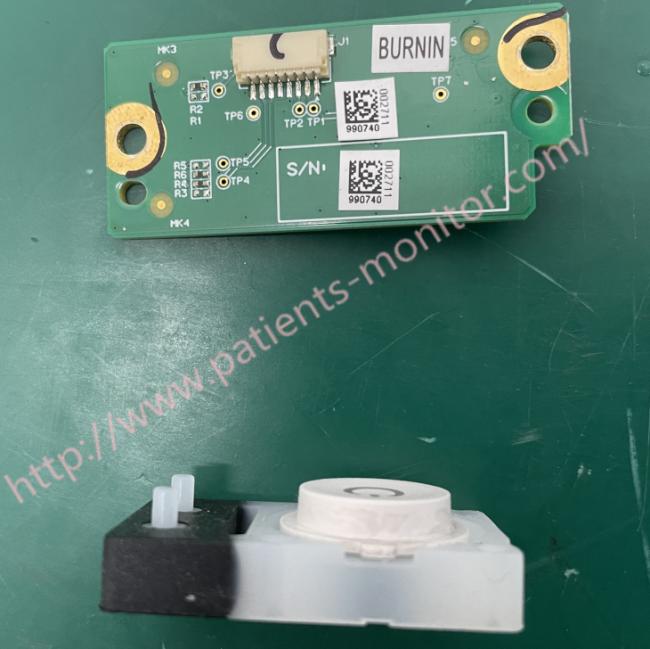
050-002302-00 Mindray BeneVision N17 Patient Monitor Power Switch Button and Power Switch Button Board
Power Switch Board
There are the power switch and three indicators on the power switch board, which are the AC on-line indicator, battery indicator, and the power-on indicator
Power switch
◆ Pressing this switch turns on the monitor.
◆ When the monitor is on, pressing and holding this switch turns off the monitor.
Power On/Off Failures
| Failure Symptom | Possible Cause | Countermeasure |
| Power on failure | AC mains not connected or insufficient battery power or battery damaged |
n Verify that AC power is properly connected. Check whether the battery capacity is sufficient and whether the battery is damaged. |
| Cable defective or improperly connected |
nCheck the cable connecting the power on/off button board to the main control board.
Verify that the connectors and corresponding sockets connecting the cables are not damaged. |
|
| Power switch and indicator board damaged | Replace the power switch and indicator board. | |
| Power module defective | Replace the power module | |
| Main control board failure | Replace the main control board |
Removing the Power Switch Board
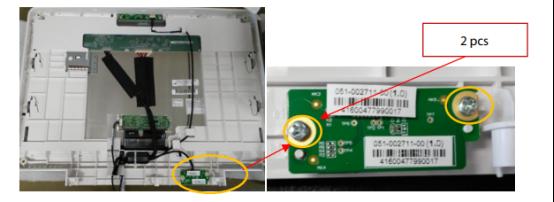
1. Remove the cable on the power switch board.
2. Remove the two PT3×8 screws and take out the power switch board
Note
- Be careful when disconnecting the cable to avoid damage. When installing, align the positioning ribs of the front shell plate and
- press the plate towards the direction of the silicone button. l
- When reinstalling the board, be careful to avoid overtightening the screws and stripping the holes.
Care and Cleaning Safety Information
Warning
• Never immerse any part of the device or its accessories in liquid or allow liquid to get inside.
• Contact of cleaning agents or disinfectants with connectors or metal parts can cause corrosion.
• Never pour or spray any liquid directly on the device or accessories, or allow liquid to enter any connection or opening.
• If liquid is spilled on the device or accessories, unplug it, dry it, and contact service.
• Never use abrasive materials (such as steel wool or silver polish) or aggressive cleaning agents .
• Dilute and use cleaning agents or disinfectants according to the manufacturer's instructions.
• Check equipment after cleaning and disinfection. Discontinue use if there are any signs of damage.
Thank you for your attention.If you're interested in Mindray BeneVision N17 Patient Monitor Parts Power Switch Button Board 050-002302-00 ,feel free to contact us .Thank you .
Get in Touch
Have questions about our products or want to discuss a custom order? Our team is ready to help you.